Billing System Update Help 

Kaiser Permanente transitioned from an older, legacy billing system to a new one. Outstanding balances from the legacy system won’t transfer to the new system so, members may temporarily have more than one bill balance.

While we’re updating our billing system, your bills will be split into two separate balances. The legacy billing system will show the balance for medical services that you received before [MM/DD/YYYY], and the new, current system will show the balance for medical services that you receive after [MM/DD/YYYY]. You’ll have different billing account numbers for the legacy billing system and the current one.

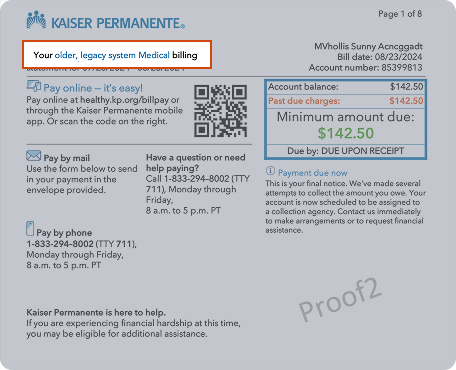
1- Visual example of an older, legacy system medical bill


”Your legacy system medical billing statement” is clearly displayed on the top of your billing statement.
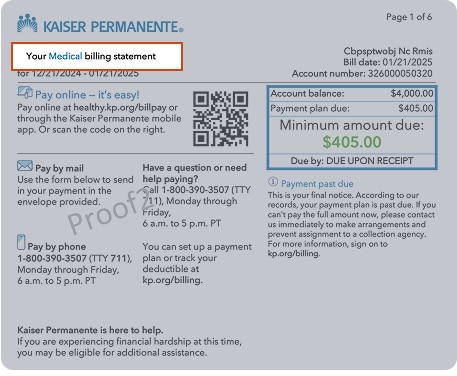
2- Visual example of a new system medical statement


New/current medical billing statement has only the dates of the service.
 

You’ll receive one statement from the older, legacy billing system for medical bills that you’ve received before [MM/DD/YYYY], and you’ll receive another statement showing medical bills for services that you’ve received after [MM/DD/YYYY]. Both new bills and older, legacy bills must be paid separately on each due date.
Yes, you can view and pay both of your balances on kp.org.
Yes, you must make separate payments towards each balance.
No, your Medical Record Number (MRN) will remain the same for both billing systems.
You cannot pay multiple accounts with one check. Your payment will be applied toward your oldest balance first.
Credits will be applied to outstanding balances in the older, legacy and current billing system and any refunds will be processed out of the new system.
Yes, you must set up a new payment plan for any medical service charges that you received after [MM/DD/YYYY].
No, you will not be able to add new charges to an existing older, legacy payment plan.
Your existing payment plans will remain in effect in our older, legacy billing system. New charges for any services received after [MM/DD/YYYY] cannot be added to an existing payment plan, so you must set up a new one.
To manage payment plans that you’ve set up in the current billing system, go to your Billing summary. To manage your existing older, legacy payment plans, you must contact Member Services.
You are still responsible for paying off the balances on your existing older, legacy payment plans. To make changes to your legacy payment plans, you must contact Member Services.